How to Get Unbanned from Facebook? 5 Step-by-Step Guide!

To get unbanned from Facebook, you must submit an official appeal. Most accounts are suspended by automated AI triggers nowadays. But the good news is you can restore access. How? Simply provide a government-issued ID and follow a few guided steps to make sure you're doing everything right.
Steps at a glance to get unbanned from Facebook:
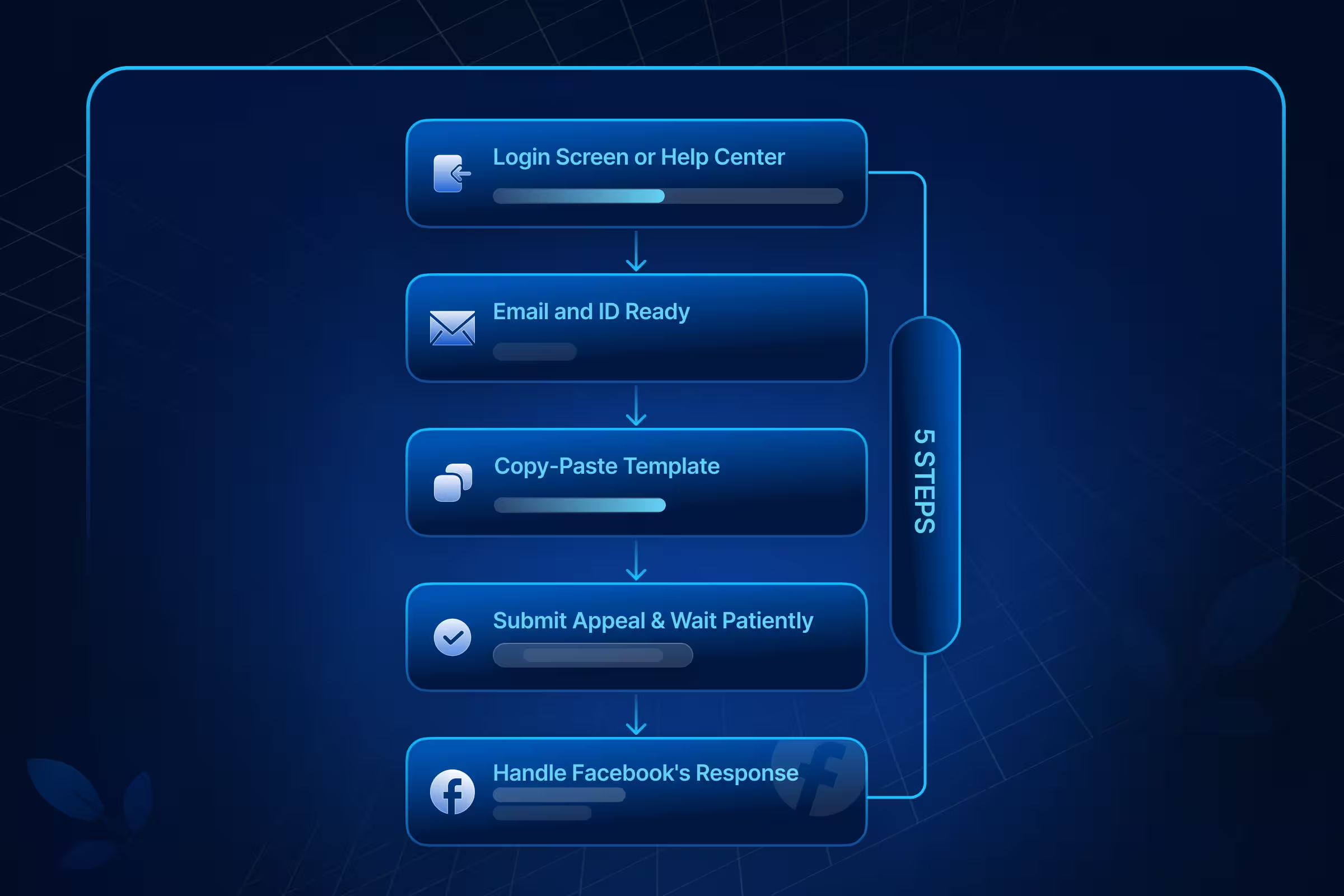
- Step 1: Find Your Appeal Link.
- Step 2: Gather Required Information.
- Step 3: Write Perfect Appeal Message.
- Step 4: Submit Appeal & Wait Patiently.
- Step 5: Handle Facebook's Response.
And, who can & cannot get unbanned?
- CAN: Legitimate users flagged by AI "false positives," hacked accounts, or those with minor "Facebook Jail" strikes who act within the allotted window.
- CANNOT: Users guilty of severe safety violations (hate speech, threats), repeat offenders, or those who missed the allotted appeal deadline.
If you, too, think you fall into the "CAN" category and your Facebook account was suspended for no reason, keep reading to find out the “Why” and “What to do” with this guide.
Get Uproas Facebook Unban Services & easily recover your accounts or pages
How to Appeal A Facebook Account Ban? Official Process
Once your account is banned from the Meta database, it's only Facebook that can reinstate it, and no backdoors is gonna help or exist for that matter. As part of Meta's policy, the appeal has an allotted deadline; past that, your data is deleted permanently.
So, how to get back on Facebook after being banned? File one precise appeal; any errors will break your credibility. And to do so, here are the exact steps you need to follow.
Your Next Move (Choose Path)
- Account Restricted → WAIT (24h-30 days auto-lift)
- Account Disabled → APPEAL (Start Step 1 ↓)
- Marketplace Only → Marketplace tab → Request Review
- Ads Only → Ads Manager → Business Verification first
Step 1: Find Your Appeal Link (Login Screen or Help Center)
The very first problem that the users encounter is how to find the relevant form for appealing the ban. Facebook does not provide a common appeal page for all of its users. The form that you will get depends solely on the type of account or service that has been blocked.
- Personal Profile Ban: Attempt to log in to Facebook. Click the "Request Review" button on the "Account Disabled" notice.
- Business Page or Group: Navigate to the Meta Business Suite or Account Quality dashboard. Appeals are processed based on "Page Quality" scores.
- Marketplace Ban: Open the Marketplace tab and select "Request Review." These are handled by commerce-specific AI.
- Ad Account Ban: Access the Ads Manager. You must perform Business Verification before the appeal interface becomes available.
Step 2: Gather Required Information (Email and ID Ready)
Meta’s systems use Optical Character Recognition (OCR) for instant verification. Ensure your documents meet these technical requirements:
- Primary ID: High-resolution scan of a Passport, Driver’s License, or National ID.
- Scan Quality: The image must show all four corners of the ID with zero glare. Blurry images are auto-rejected by AI without human review.
- Data Matching: Your legal name and birthday on the ID must match your Facebook profile exactly.
Mobile App vs. Desktop Appeal (2026 Comparison)
Step 3: Write Perfect Appeal Message (Copy-Paste Template)
While going about getting unbanned from Facebook, brevity is your friend in 2026. The support queue of Meta handles millions of tickets daily. To make sure your appeal doesn’t get lost in the crowd, use this template:
Subject: Appeal for Disabled Account [Your Email/Phone]
Message: Facebook Team, my account [Email Address] is disabled from [Date]. It is a [Personal/Business/Family] account. All activity on my account complies with Facebook Community Standards, in my honest opinion. It is a function of automated flagging gone wrong. Please manually check my activity. Your consideration to resolve my problem is appreciated here.
Key elements to remember:
- Keep it under 100 words.
- Mention "Manual Review" specifically.
- Be polite; aggressive language can lead to an instant "Case Closed" status.
Step 4: Submit Appeal & Wait Patiently (24h-21 Days)
Once you hit submit, your appeal enters a global queue.
- Timeline: While some users get a response in 24 hours, the average wait time is 7 to 14 days.
- Status Check: You will get a reference ID by email. While one case is pending, do not open new tickets. The system flags multiple tickets about the same issue as "System Abuse" and moves your request to the bottom of the pile.
- Silence is Normal: A two-week silence doesn't mean you are rejected; it means the queue is backed up.
2026 Recovery Timeline Expectations–
- 24-48h: Auto-restore (minor restrictions)
- 7-14 days: Average ID appeal response
- 21-30 days: Ad Account/Page complex cases
- 60+ days: Oversight Board (if selected <1%)
Step 5: Handle Facebook's Response (3 Possible Outcomes)
Expect Facebook to respond with one of these 3 outcomes:
- Account Restored: Log in immediately and enable Two-Factor Authentication (2FA) to satisfy security trust signals.
- More Information Needed: This usually means your ID scan failed OCR. Resubmit a clearer, high-contrast photo.
Want to scale up efficiently? Consider buying Facebook Business Managers.
Facebook Account Suspended vs Facebook Account Ban
Knowledge of terminology is critical in selecting an appropriate recovery tactic. Many people panic, thinking that they are banned permanently when, in fact, they are in "Facebook Jail."
Wondering What Facebook Jail is?
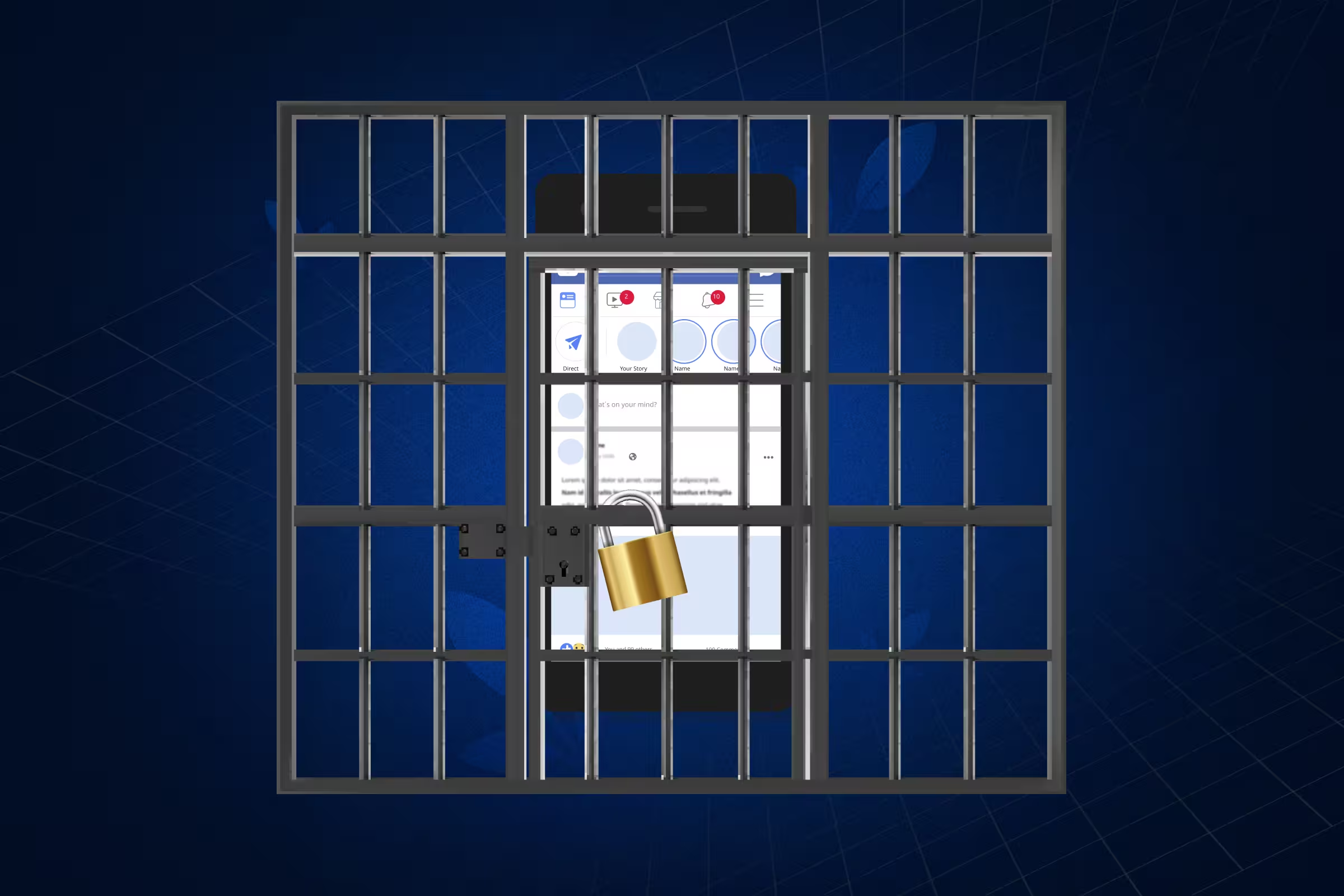
"Facebook Jail" is the community term for a Temporary Account Restriction. Unlike a permanent ban, where your account is deleted, being in Facebook Jail means you are "locked behind bars"; you can see what’s happening on your feed, but you cannot participate.
How Facebook Jail Works (The Strike System)
Meta uses a standardized "Strike System" to determine your time behind bars:
- 1 Strike: A warning; no restriction.
- 2–6 Strikes: Restricted from certain features (like posting in groups) for 24 to 72 hours.
- 7 Strikes: A 1-day ban from all posting/commenting.
- 8 Strikes: A 3-day ban.
- 9 Strikes: A 7-day ban.
- 10+ Strikes: A 30-day "maximum sentence" in Facebook Jail.
Signs You Are in Facebook Jail
You’ll know you’ve been "arrested" if you see these signs:
- An error message saying: "You are temporarily blocked from performing this action."
- The inability to like, comment, or share posts.
- A notification in your Support Inbox detailing which post violated a standard.
Note: While in jail, your priority should be total compliance. Attempting to bypass the block with a second account on the same device often results in that "temporary jail" turning into a permanent Facebook ban.
Why Does Facebook Ban Accounts?
Meta’s "Security Graph" is more aggressive than ever. It is triggered by automated AI filters designed to maintain platform's "Health." If you’ve been flagged, it usually falls into one of these three categories:
1. Inauthentic Identity (The Most Common 2026 Ban)
Meta is on a crusade against bots. If your account looks "fake"—meaning you use a pseudonym, have no profile picture, or provided a fake date of birth—the AI will flag you for Identity Verification.
- The "Nickname" Trap: Using names like "John the King" instead of your legal name is an instant red flag for 2026 algorithms.
- New Account Surge: Creating a profile and immediately running ads or joining 20+ groups is seen as "bot behavior" and leads to an instant suspension.
2. Behavioral Anomalies (Spam & Velocity)
Facebook tracks the "velocity" of your actions. If you "move too fast," you are flagged as a spam bot.
- Engagement Spikes: Sending more than 20 friend requests in a day or liking 50+ posts in an hour triggers a "Velocity Block."
- Copy-Paste Content: Posting the exact same comment or link across multiple groups is detected as a "Spam Campaign."
3. Community Standards Violations
This involves the content you post. Meta’s AI scans images, videos, and even private Messenger chats for:
- Intellectual Property: Posting copyrighted music or movie clips.
- Objectionable Content: Anything categorized as hate speech, graphic violence, or adult content.
- Dangerous Affiliations: Interaction with groups flagged for extremism or misinformation
What Are the Chances of Getting Unbanned from Facebook?
Recovery is never 100% guaranteed, but the statistics suggest certain patterns:
- First-time accidental bans: Highest recovery rate when a valid government ID verifies account ownership
- Hacked accounts: Strong recovery potential with device/location proof matching profile activity
- Repeat policy violators: Significantly lower success due to established violation history
- Hate speech/safety violations: Very low recovery rates - Meta prioritizes platform safety
- Oversight Board appeals: Rarely accepted (<1% selection rate per Meta Transparency Report)
Types of Facebook Bans
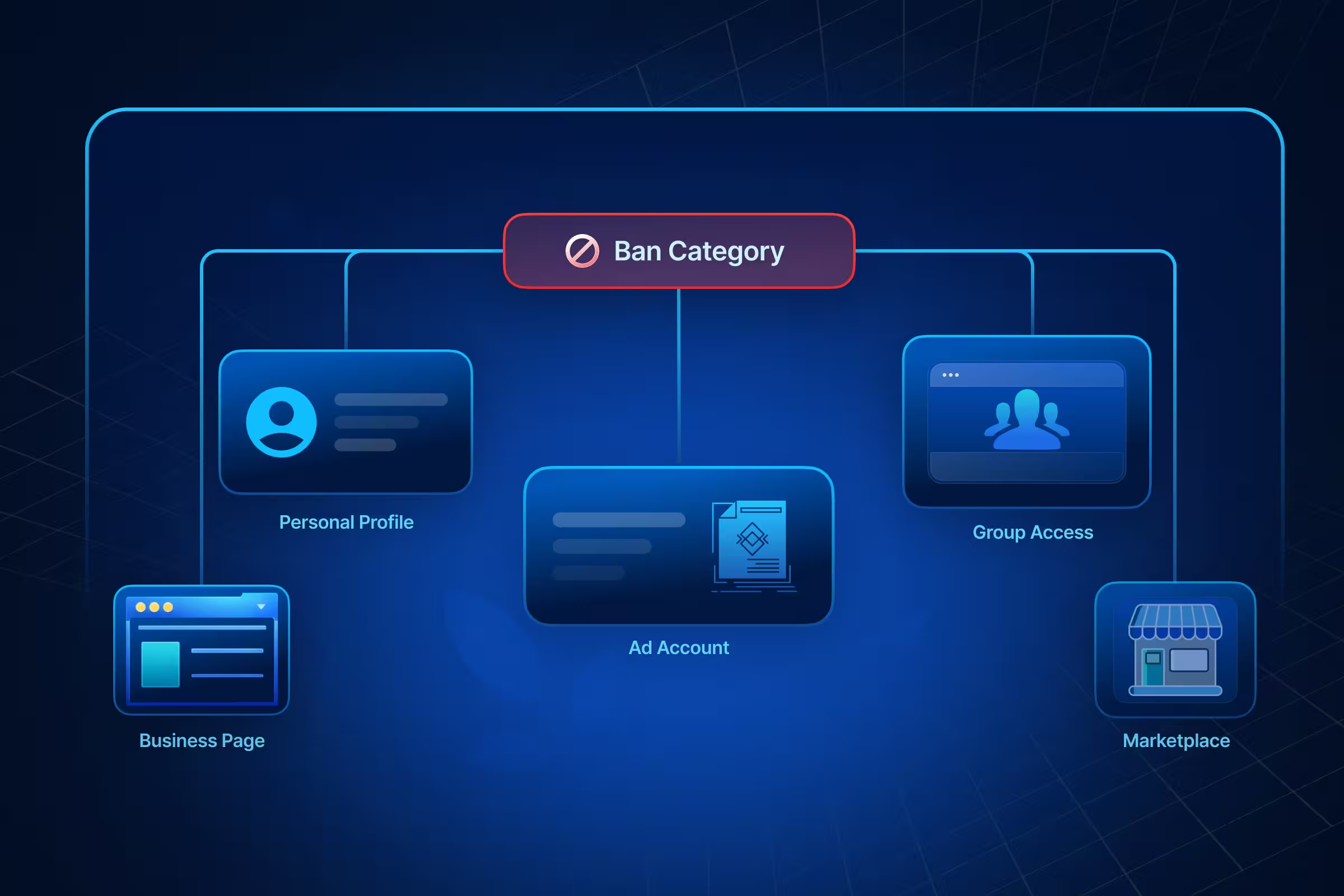
In order to make sure you have a precisely curated answer on how to get unbanned from Facebook, you first need to identify which specific ban is enforced on your account. The Meta ecosystem is highly fragmented, largely due to the Meta Andromeda Update.
While Andromeda was designed to revolutionize AI-driven content delivery, its aggressive 'Entity ID' tracking means you might find yourself banned from one specific feature, while your personal profile remains active. Understanding this distinction is the first step toward a successful appeal.
Here’s some Facebook ban types & recovery cheat sheet for you:
Key: Wrong path = auto-rejection. Match ban → correct dashboard.
Get a Full Report on How Meta Rates Your Facebook Assets!
How Facebook Reviews Banned Accounts (Automation vs Manual Review)
In 2026, Facebook uses a "Tiered Review" system.
- Level 1: AI Decision. The AI searches through your posts, photos, and login data. If it finds a match for illegal content, it will turn off your account automatically.
- Level 2: The Appeal Queue. Once you appeal, a “Light AI” verifies your ID with your profile information. If it matches, the case goes to a human.
- Level 3: Human Review. The human moderator (sometimes a contractor for a third party) gets about 30 to 60 seconds to view your case and the suspicious material. That’s why it’s important for you to write a clear and concise appeal message.
Why appeals take time: In instances where a global event or an algorithmic update affects the network, there are a lot of “false positives” (wrongful bans) that result in a backlog of level 3 reviews.
How to Recover a Facebook Account Without ID?
It is much more significantly tricky than it was five years ago to restore a login without a government ID.
- Trusted Contacts: These are useful if you have established them prior to being banned. They will enable you to authenticate your identity.
- Device Recognition: If you sign in from a "known device" (phone or computer that you’ve used for years), then the AI system is probably going to allow you to sign in with just an email verification.
- Alternative Documents: You can upload two types of alternative identification, including a library card, a student identification card, or a utility bill. The important part is to ensure that your name on those documents is exactly the same as your name on Facebook.
When Appeals Fail: Long-Term Recovery Options?
If Meta’s review of your account results in a "Final Decision" or you are met with a "No Appeal Form Available" error, your standard recovery window has likely closed. Failures are typically categorized by specific technical and behavioral triggers.
OFFICIAL META REASONS (Facebook Help Center):
- ID verification failure: Mismatched names, blurry photos, or incomplete scans (missing corners).
- No appeal eligibility: Severe safety violations or accounts that have already exhausted their review limits.
- Multiple appeals: "System Abuse" detection caused by submitting duplicate tickets.
- Final decision upheld: A second manual or AI review confirmed the initial violation.
COMMON TECHNICAL FAILURES (Meta Policy + User Data):
- Pseudonym/nickname: Profile name fails to match the legal government ID provided.
- VPN/proxy usage: Triggers "Suspicious Login" auto-flags during the appeal process.
- Aggressive appeal language: Hostile or emotional text leads to an instant "Case Closed" status.
- Poor ID quality: Glare on text or missing edges causing OCR (Optical Character Recognition) failure.
BEHAVIORAL TRIGGERS (Community Standards):
- Repeated policy breaches: Escalation through the "Strike System" to a permanent ban.
- Inauthentic behavior: Coordinated spam, bot-like activity, or mass-joining groups.
- Safety violations: Content involving hate speech or child safety—these are often auto-finalized.
- Copyright/Ad strikes: Repeated intellectual property theft or circumventing ad systems.
SYSTEM ERRORS (AI False Positives):
- Video selfie rejection: The 2026 automated identity loop often times out or denies valid faces.
- New account bot detection: Instant suspension of fresh accounts created on "flagged" hardware.
- Missing Appeal Button: A direct permanent disablement that bypasses the standard review interface.
Last-Resort Recovery Pathways
- The Oversight Board: You can submit your case via the Oversight Board website. They select cases that involve changes in platform policy. It's a bit of a long shot, but worth a try if you're a high-profile creator.
- Wait 180 Days: Sometimes, after the data retention period, the "shadowban" on your IP or device will lift, allowing you to start afresh.
- Demand for Data (EU/UK/California): If you are in a region where strong data privacy laws are in effect- say, something like the GDPR or CCPA, you have legal rights to demand a copy of your data. This won't remove the ban but will let you recover your photos and contacts before the account gets deleted forever.
Make sure to avoid the Don’ts, so that your appeals don’t automatically fail generically.
So, What NOT to Do During a Facebook Appeal?
If you want to avoid permanent blacklisting, make sure to stay away from these three most common pitfalls:
- DON'T Pay "Recovery Experts": Scammers on X, Instagram, or Telegram claim they can "hack" your account back. Meta has no third-party partners; these are phishing attempts to steal your money and data.
- DON'T Spam Appeals: Do not submit daily requests. Multiple submissions trigger "System Abuse" filters, which automatically move your ticket to the bottom of the queue.
- DON'T Create a New Account Immediately: Meta uses "Device Fingerprinting" to link banned hardware. Opening a new profile on the same phone or computer will trigger an instant auto-ban for "evading enforcement."
How to Create a New Facebook Account After Being Banned?
If you've lost your account and need to start fresh, fully reset your digital footprint to avoid "Recidivist" flags. Skipping this leads to instant re-bans and repeated questions like "Why did Facebook suspend my account?” Here’s what you need to do:
- New Device/Browser: Switch computers if possible. On the same device, clear all cookies/cache and use a different browser.
- Fresh Connection: Avoid your banned Wi-Fi IP. Use mobile data for signup to bypass location tracking.
- New Credentials: Create with a fresh email and phone number. Never link to the old Instagram or WhatsApp account.
- Gradual Activity: Post 1-2 times daily, engage naturally. Skip mass friending to dodge "New Account Bot" filters.
Do you need to create different Facebook ad accounts? Read our Facebook Ads Statistics guide.
How to Prevent a Facebook Account Ban?
To prevent your new Facebook account from being suspended, make sure to follow these "Safe Usage" rules:
- Enable 2FA immediately: Accounts with Two-Factor Authentication significantly reduce ban risk, as Facebook considers them "High Trust." Permanently banned from Facebook accounts rarely had it enabled.
- Avoid Automation: Never use "Auto-likers," "Auto-posters," or tools that "see who viewed your profile." These are the #1 cause of bans.
- Check "Account Quality" Monthly: Go into your Meta Business Suite regularly and check whether there are minor warnings that might have been missed.
- Separate Personal and Business: Never run business ads from your personal profile; always use the dedicated Business Manager account.
Conclusion
Recovering a blocked Facebook account in 2026 demands technical precision over repeated attempts. Getting banned on Facebook happens instantly through AI automated flags (rapid logins, automation patterns), but how to get unbanned from Facebook? Now that needs to follow a verified path: one verified-ID appeal through official channels.
Remember, 'System Abuse' flags will cause your case to rank last. A perfect OCR scan ID coupled with a brief 'Manual Review' appeal has your best chance at success. The key to success is to hold out during your 7-14 day processing period for Facebook Banned Account Recovery with patience.
Frequently Asked Questions


Latest blogs
Marketing Mix Modeling: Master Revenue Growth
Stop trusting broken attribution data. Learn how marketing mix modeling bypasses tracking limits to uncover true revenue and optimize ad spend.
Types of Retargeting: The Full Guide for Marketers
Explore major types of retargeting, from pixel-based to dynamic and sequential, and learn how to combine them into a converting campaign.
Targeted Advertising: How It Works and How to Use It Well
Build a bulletproof targeted advertising strategy. Turn raw behavioral data into profitable segments using our step-by-step optimization plan.
Retargeting vs Remarketing: The Difference Every Marketer Needs to Know
Stop treating Retargeting vs Remarketing as identical. Use a precise, high-impact framework to weaponize your data and maximize conversions.

Google Ads Cost: What You'll Really Pay (By Industry, Campaign Type, and Business Size)
Stop wasting budget on vague pricing. See exact 2026 Google ads cost benchmarks by industry, real CPC data, and the formula to reduce your ad spend.

Types of Facebook Ads: A Complete Guide to Every Format in 2026
See all types of Facebook ads, including current specs, placements, and objectives, plus a matching table to pick the right format for your goal.
ABM Stats: 2026 Benchmarks, ROI & Trends
From ROI to pipeline velocity, these 2026 ABM stats show exactly why account-based marketing dominates B2B growth.
.jpg)
The Real Price of Social Media Advertising: A Cost Guide for Advertisers
Find out what social media ads actually cost these days. Get to know about CPC, CPM, CPL, industry verticals, budget ranges, and ROAS across major platforms.
Bing Ads Cost in 2026: Everything You Need to Know
Stop wasting money on ad spend. See the 2026 Bing Ads cost benchmarks, real industry CPAs, and hidden ROI data you need to outperform competitors.