Google Ads Cost: What You'll Really Pay (By Industry, Campaign Type, and Business Size)

Google brought in over $294 billion in ad revenue last year, and more than a million brands now use automated options like Performance Max.
Those numbers show just how effective search advertising can be, but they also highlight a big risk. Without a clear plan, Google Ads will gladly eat through your budget without returning a single qualified lead.
Avoiding that waste comes down to knowing what actually shapes your Google Ads cost before you start placing bids.
Whether you are mapping out a fresh budget or trying to figure out why last month’s invoice was so high, generic estimates will not help you. This breakdown covers current benchmark data, real CPC ranges, and the auction mechanics that dictate what you actually pay.
Quick Key Stats You Should Know

- Average CPC across all industries on Google Search: $5.26 (WordStream, 2025)
- Average CPC on the Display Network: $0.63, roughly 88% cheaper than Search
- Average cost per lead (CPL) across all industries: $70.11, up 5.13% year over year
- Average conversion rate across Search campaigns: 7.52%
- Typical starting monthly budget for small businesses: $1,500 to $8,000
- Average wasted spend per Google Ads account: $1,127.54 per month, out of an average monthly spend of $3,127.38 (WordStream account study)
- Average revenue return: businesses report earning roughly $2 for every $1 spent
- Percentage of accounts with zero conversions over a 90-day window: 29%
Are your stats lower than the average? Boost your revenues by getting agency accounts from Uproas.
What Google Ads Is and How the Pricing Actually Works
Google Ads runs on a pay-per-click, or PPC, model. You don't pay for a fixed placement the way you would with a billboard or a magazine ad. You pay only when someone clicks your ad, or in some cases when your ad is shown a certain number of times.
That single distinction is why Google Ads pricing feels so different from flat-rate advertising. Your cost moves with competition, relevance, and demand in real time. You need to understand a few core terms before the numbers in this guide will make sense.
Google Ads also isn't one single product. It's five distinct campaign types, and each one carries a meaningfully different price tag.
- Search shows text ads on Google's results pages and carries the highest intent, and often the highest CPC.
- Display places banner ads across millions of websites and apps, at a fraction of Search's cost.
- Shopping shows product listings with images and prices directly in search results.
- Video runs ads on YouTube and charges by view or by impression.
- Performance Max blends all of the above into a single AI-managed campaign.
We'll cover the cost profile of each type in Section 8. For now, know that asking how much Google Ads costs without specifying the campaign type is like asking how much a car costs without saying whether you mean a compact sedan or a delivery truck.
The Full Cost Breakdown: CPC, CPM, CPA, and Monthly Spend
Below are the current benchmark figures across Search and Display, plus realistic monthly spend ranges by business size.
Search vs. Display: the two most different price points on the platform
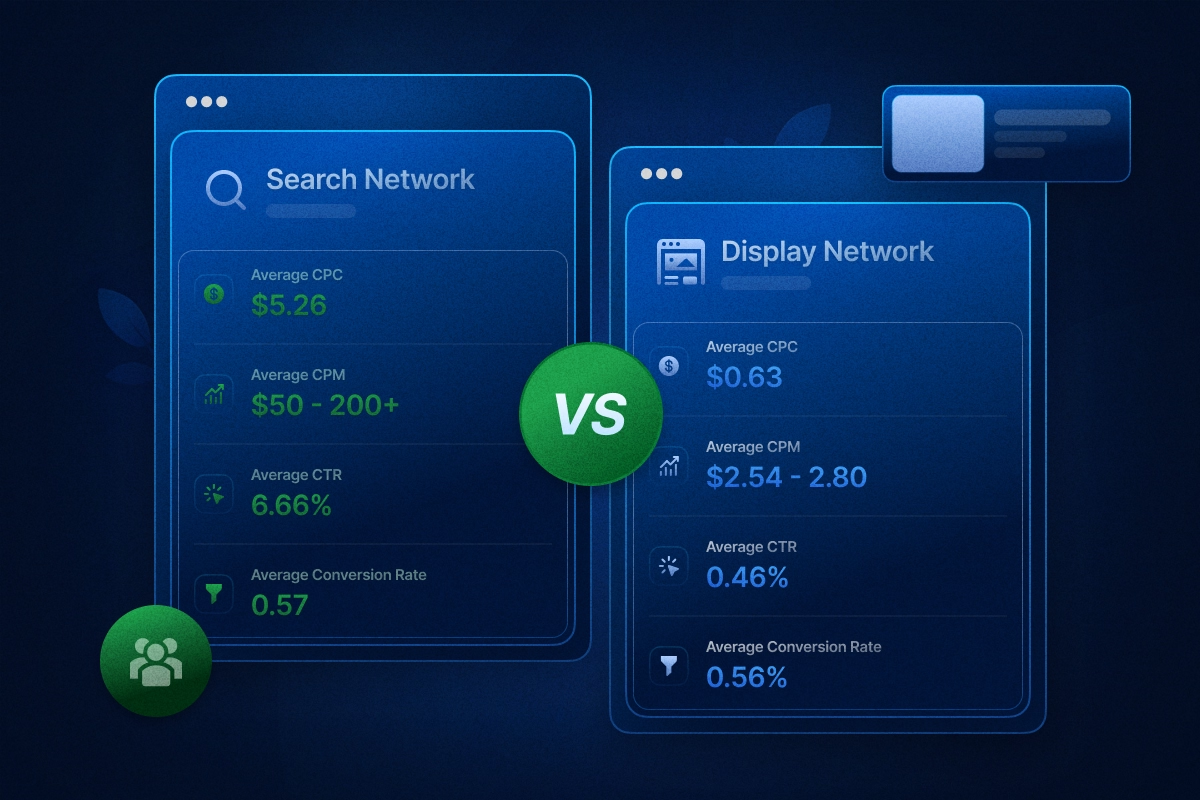
The gap is intentional. Search captures people actively typing a query, so intent is high and so is the price. Display shows your ad to people who are browsing, not searching, so it delivers reach and awareness at a much lower cost per impression.
Monthly Google Ads spend by business size
These ranges hold up across multiple 2025 and 2026 budget analyses, and they track closely with WordStream's own guidance on setting a Google Ads budget. A small local business with a tight service area might comfortably sit at the low end. A national or multi-location brand competing on head-term keywords will need to be well into six figures a month to maintain visibility.
Google Ads Cost by Industry
Industry is the single biggest factor in what you'll pay per click. Below is the full 2025 breakdown across 23 industries, based on WordStream's analysis of more than 16,000 US search campaigns.
Average CPC and CPA by industry
Legal, home services, and dental sit at the top of the CPC range, and it isn't random. A single client can be worth thousands of dollars in lifetime value for an attorney or a home improvement contractor.
So those advertisers can afford to bid aggressively and still turn a profit. Arts, entertainment, and travel sit at the bottom because the transaction value per customer is lower and the buying decision is often impulsive rather than urgent.
Do you know: Improving your landing page conversion rate is usually the fastest way to bring your overall google leads cost down.
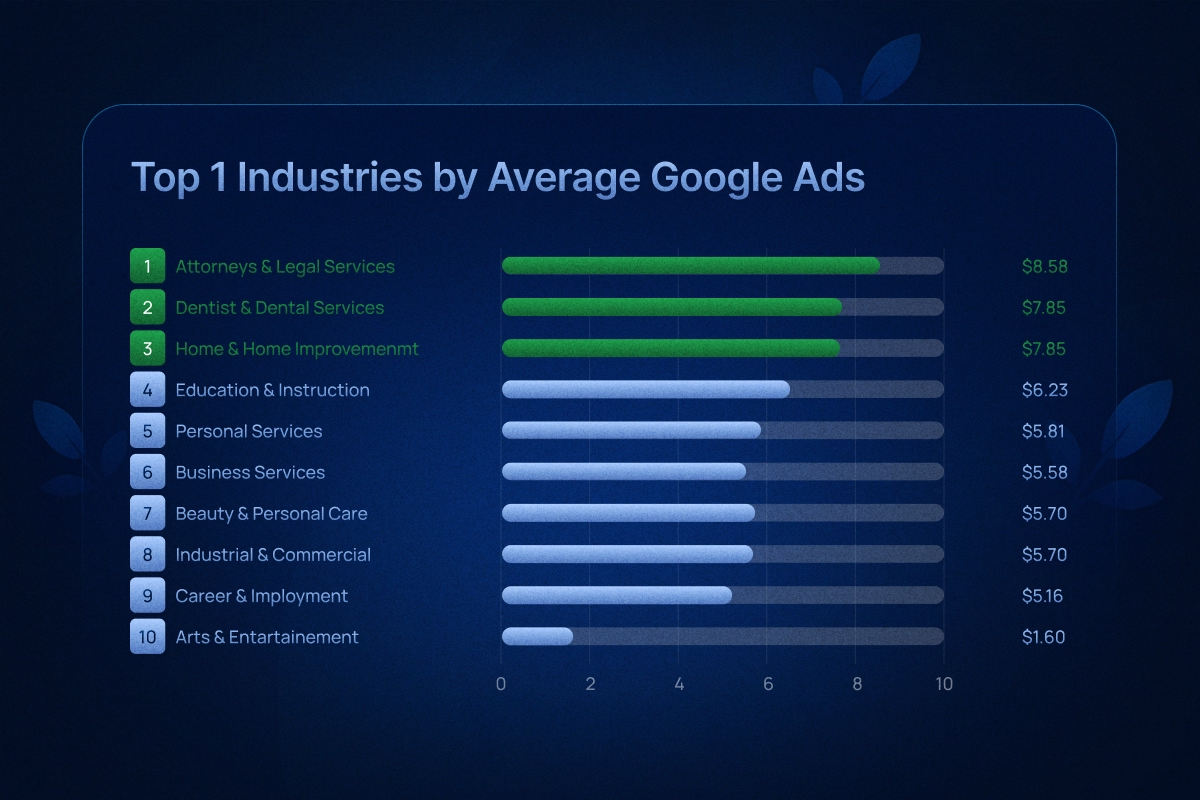
The CPA column tells a slightly different story. Attorneys pay the highest cost per lead by far, at $131.63, largely because legal services also convert at one of the lowest rates on the platform, 5.09%. Automotive repair, by contrast, pairs a modest $3.90 CPC with a 14.67% conversion rate, the highest of any industry, which pulls its CPA all the way down to $28.50.
For a full breakdown of how these numbers compare across platforms, see this analysis of Google Ads benchmarks by industry.
How the Google Ads Auction Sets Your Price
This is the part of Google Ads that most guides explain poorly. Here's the plain version.
Every time someone searches a keyword you're bidding on, your ad enters a real-time auction against every other advertiser bidding on that same term. Google doesn't just rank ads by who bids the most. It ranks them by Ad Rank, which combines your bid with your Quality Score.
Also, you should know that, the average cost of a google ad varies widely by industry, your actual spend depends heavily on keyword competition and Quality Score.
Three components make up Quality Score:
- Expected click-through rate: how likely your ad is to get clicked based on past performance
- Ad relevance: how closely your ad copy matches the search intent
- Landing page experience: how relevant and useful your landing page is once someone clicks
A higher bid does not automatically win. A well-optimized account with a strong Quality Score can outrank a bigger spender, and often pay less to do it.
The actual CPC formula
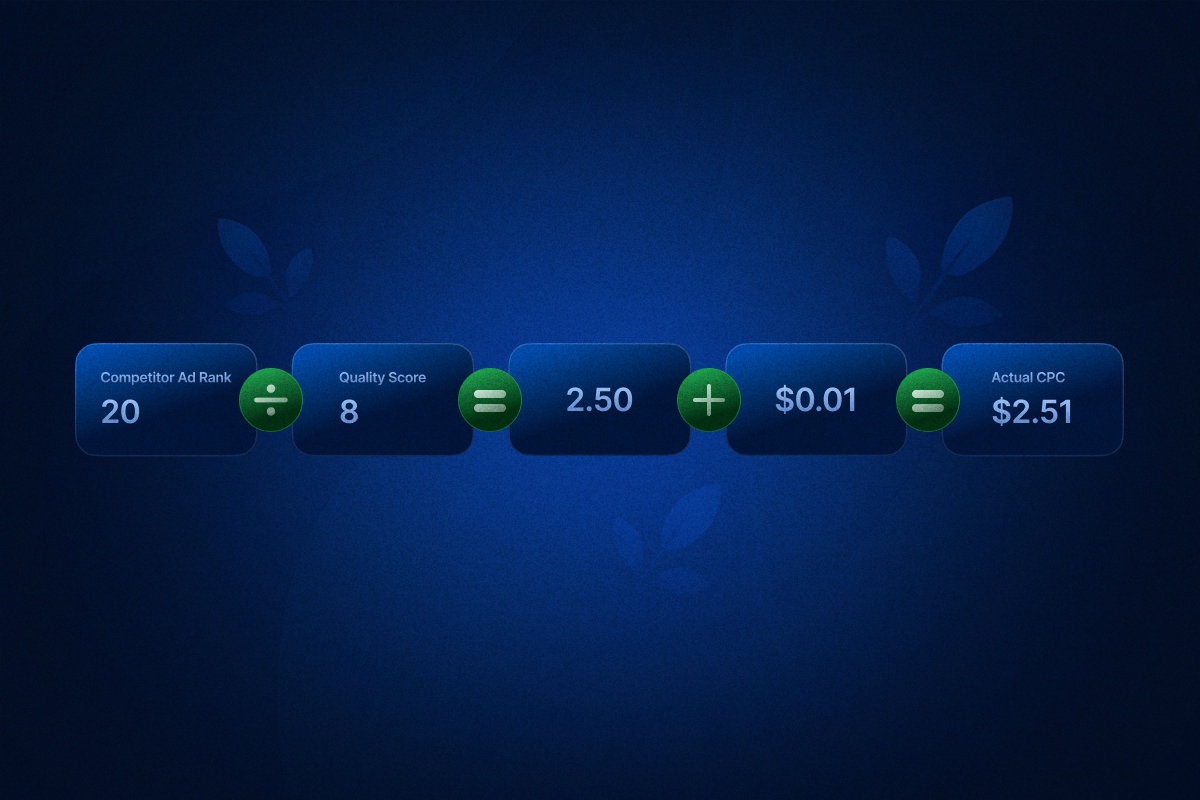
Google calculates your actual cost per click as: (Ad Rank of the ad ranked directly below you ÷ your Quality Score) + $0.01
A worked example
Say you bid $3.00 and have a Quality Score of 8. Your Ad Rank is 24.
A competitor bids $5.00 but has a Quality Score of only 4. Their Ad Rank is 20.
Because your Ad Rank is higher, you outrank them, despite bidding $2.00 less per click. Your actual CPC works out to (20 ÷ 8) + $0.01, which is $2.51. You pay less than your own bid, and less than a competitor who's willing to spend $5.00 per click.
That's the entire game in one example: relevance beats raw budget. However, the search network runs on a live auction, the price for google ads fluctuates constantly based on competitor bids and local demand.
The Eight Factors That Push Your Google Ads Cost Up or Down
Understanding how google ads pricing works allows you to set realistic daily caps without blowing your budget on low-converting clicks. Your industry sets the baseline. These eight variables determine what you pay within that.

- Industry and keyword competition: More advertisers bidding on the same term means a higher price floor for everyone.
- Keyword match type: This is one of the most underexplained cost drivers in the entire platform. Broad match tells Google to show your ad for a wide range of related searches. This drives up wasted spend fast, especially in newer accounts that have not built out a negative keyword list yet. Phrase and exact match keep you closer to actual buyer intent, usually at a lower average CPC.
- Quality Score: As shown above, a strong score can cut your effective CPC significantly. This ties directly into your overall cost per result formula, since every factor here feeds into that single number.
- Bidding strategy: Manual CPC gives you full control but requires constant attention. Automated strategies like Target CPA hand pricing decisions to Google's algorithm. With enough data, this can lower costs. Without it, spending can become unpredictable.
- Geographic targeting: National campaigns generally cost more than hyper-local ones because you're competing against a much larger pool of advertisers.
- Device targeting: Mobile, desktop, and tablet each convert differently, and bid adjustments by device are one of the most underused cost levers available.
- Ad scheduling: Running ads around the clock without reviewing performance by hour is a common source of wasted spend. Bid adjustments by time of day can meaningfully change your blended CPC.
- Audience targeting settings: Layering in remarketing lists, customer match, or in-market audiences changes who sees your ad and how much you pay to reach them.
Google Ads Cost by Campaign Type
Each campaign type has its own typical price range and its own job to do.

Performance Max deserves extra attention because it's a live debate in the advertiser community. Google increasingly nudges advertisers toward it as the default recommendation, and adoption has jumped from 60% of surveyed advertisers in 2024 to 71% in 2025.
PMax blends Search, Display, YouTube, Shopping, and Gmail placements into one automated campaign. Its blended CPC often comes in lower than a standalone Search campaign because it pulls in cheaper Display and video impressions alongside pricier Search clicks.
Things to Consider: A lower blended CPC doesn't automatically mean better ROI. Some advertisers report PMax cannibalizing traffic that would have converted through Search anyway, just at a lower reported cost per click. This can make performance look more efficient than it actually is. Protect your PMax budget from branded search overlap.
If you are exploring other platforms, check our Bing vs Google Ads comparison to see the exact cost differences.
How Google Ads Budgeting Works
There are three budget-related terms that confuse almost every new advertiser: daily budget, daily spending limit, and monthly spending cap.
Your daily budget is the amount you tell Google you're comfortable spending per day, on average. Google does not treat this as a hard daily ceiling. On higher-traffic days, it can spend up to double your daily budget. On slower days, it spends less, smoothing out to your intended average over the course of a month.
Your monthly spending cap is what actually protects you from overspending. Google calculates it as: Daily budget × 30.4
A concrete example
Say you set a daily budget of $50. On a busy Monday, Google might spend $95 because search volume was high. On a quiet Wednesday, it might cost $20. Over the full month, though, Google will not charge you more than $50 × 30.4, which is $1,520.
This double-spend mechanic causes real frustration for advertisers who see a $95 charge on one day and assume something's broken. It isn't. Google builds this into the platform, and the monthly cap is what matters.
Shared budgets
A shared budget lets you pool a single budget across multiple campaigns instead of assigning a fixed amount to each one individually. This makes sense when campaigns have similar priority and you want Google to shift spend toward whichever one is performing best.
It causes problems when one high-priority campaign quietly starves out a smaller one that also needed room to run. If your campaigns have different goals or different urgency, individual budgets usually work better.
How to Set Your Google Ads Budget: A Practical Framework
When business owners ask how much do google ads cost, the real answer comes down to how efficiently you target high-intent searchers.
Here's a step-by-step way to arrive at a realistic starting budget, rather than guessing.
Step 1: Define your goal and target CPA. Decide what a conversion is worth to your business, and how much you're willing to pay to get one.
Step 2: Estimate your conversion rate. Use your industry's benchmark as a starting point if you don't have historical data yet.
Step 3: Calculate the clicks you'll need. Divide your target number of conversions by your estimated conversion rate.
Step 4: Estimate your CPC. Use Google's Keyword Planner, which provides bid range estimates for your specific keywords, or fall back on industry benchmarks.
Step 5: Multiply clicks needed by CPC to get your monthly budget.
A worked example: a dental practice

- A local dental practice wants 20 new patient leads per month.
- Industry average conversion rate for dentists: 9.08%
- Required clicks: 20 ÷ 0.0908 ≈ 220 clicks per month
- Industry average CPC for dentists: $7.85
- Estimated monthly budget: 220 × $7.85 ≈ $1,727
- Add a buffer for the learning phase and testing, and a realistic starting budget lands closer to $2,000 to $2,500 per month.
What counts as a minimum viable testing budget
You need enough spend to collect statistically meaningful data, not just enough to get a few clicks. As a rough floor, most advertisers need around 15 to 30 conversions within a 30 to 90 day window before they can trust the data enough to optimize confidently.
Certain automated bidding strategies also need this volume to function well. Below that, you're mostly guessing.
Bidding Strategies and What They Do to Your Cost
Your bidding strategy directly shapes what you pay and how predictable that spend is.
Smart Bidding strategies like Target CPA and Target ROAS need real conversion data to work well. Google generally recommends at least 15 to 30 conversions per campaign per month before switching to Target CPA, and closer to 50 conversions before Target ROAS has enough signal to perform reliably. Launch either one cold, without that history, and the algorithm is essentially guessing, which can burn through budget fast while it "learns."

The riskiest combination on the entire platform is running Maximize Conversions with no target CPA cap set. Without a ceiling, the algorithm will spend your full daily budget chasing volume regardless of what each conversion actually costs you, and that can drain a budget in days if you do not watch it closely.
If managing these settings feels like a full-time job, a dedicated Ads agency account from Uproas can take that weight off your plate.
Google Ads Management Costs: DIY, Freelancer, or Agency
The ad spend itself is only half the equation. Managing the account costs something too, whether that's your own time or someone else's fee.
Percentage-of-spend is the most common agency model, and it typically runs 10% to 20% of ad spend, with smaller accounts often paying toward the higher end and larger accounts negotiating down. An enterprise account spending $100,000 or more per month can expect flat management fees in the $8,000 to $15,000+ range.

There's a hidden cost worth factoring in too: the price of not having proper management. The average Google Ads account wastes $1,127.54 per month, out of an average total spend of roughly $3,127, according to WordStream's analysis of over 15,000 accounts. That's over a third of a typical budget going to clicks that never convert. A quarter of accounts in that same study had never added a single negative keyword. Weigh a management fee against that number, not against zero.
How to Lower Your Google Ads Cost Without Hurting Results
- Focus on your Quality Score: Google actually gives you a discount on clicks when your keywords, ad text, and website all match up perfectly. Making sure those three things tell the same story is the easiest way to make your whole account cheaper to run.
- Move away from broad match: Broad match keywords bring in a ton of traffic, but a lot of it is completely useless. Using phrases and exact matches takes a bit more time to set up. However, doing so stops you from buying junk clicks.
- Keep adding negative keywords: This tells Google what searches you absolutely do not want to show up for. Blocking unrelated terms keeps your money focused on actual buyers. You really need to check your search reports and add new negative words every single week.
- Stop showing ads during dead hours: Look at your data to find out when your customers actually buy. If you are paying for clicks at two in the morning but getting zero sales, simply pause your ads overnight and save that budget for the afternoon rush.
- Fix the website itself: A lot of people spend hours tweaking their ad settings but completely ignore the actual landing page. If you can get your site to convert at 10 percent instead of 5 percent, your cost per lead drops in half instantly. You do not even have to touch a bid to make that happen.
- Block the window shoppers: If you notice a specific group of people constantly clicking your ads but never pulling out their credit cards, just exclude them from your targeting. There is no point in paying for their browsing habits.
Is Google Ads Actually Worth the Cost?
The honest answer: it depends heavily on who's asking.
Google Ads earns its keep for businesses with high-intent, bottom-of-funnel demand. If people are actively searching for what you sell, Search campaigns put you in front of them at the exact moment they're ready to buy. That's a fundamentally different value proposition than most other ad channels, which interrupt rather than respond to intent.
The ROI data backs this up in aggregate. Advertisers report earning roughly $2 in revenue for every $1 spent on average, and a large share of small businesses report being satisfied with their search advertising results.
For context on how that stacks up elsewhere, check these ROAS benchmarks by platform.
However, averages hide a lot of variance. Google's own reported ROAS figures also tend to run higher than independent measurement, since platform attribution often credits conversions that would have happened anyway.
Google Ads tends to be a poor fit in a few specific scenarios:
- Very low margins, where the cost per acquisition eats most or all of the profit on a sale
- No conversion tracking in place, since you're effectively flying blind on whether spend is working
- Purely brand-awareness goals in categories with little to no search demand, where Display or social platforms are usually a more efficient use of budget
If you fall into one of the first two categories, the fix is often not "spend less on Google Ads." It's "fix conversion tracking first, then reassess." If you fall into the third, a conservative test budget, or a completely different channel, is usually the smarter starting point.
The Bottom Line
Ultimately, your Google Ads cost is never a fixed price handed down by the platform. It is the direct result of how tightly you manage your account.
To stop overpaying, you must actively pull the right levers:
- Refine match types: Block irrelevant, budget-draining traffic.
- Boost Quality Score: Force the algorithm to discount your clicks.
- Fix landing pages: Convert more of the traffic you already buy.
The most profitable advertisers never just set a budget and walk away. Use industry benchmarks to start, but let actual conversion data dictate your next move.
FAQs


Latest blogs

Google Ads Cost: What You'll Really Pay (By Industry, Campaign Type, and Business Size)
Stop wasting budget on vague pricing. See exact 2026 Google ads cost benchmarks by industry, real CPC data, and the formula to reduce your ad spend.

Types of Facebook Ads: A Complete Guide to Every Format in 2026
See all types of Facebook ads, including current specs, placements, and objectives, plus a matching table to pick the right format for your goal.
ABM Stats: 2026 Benchmarks, ROI & Trends
From ROI to pipeline velocity, these 2026 ABM stats show exactly why account-based marketing dominates B2B growth.
.jpg)
The Real Price of Social Media Advertising: A Cost Guide for Advertisers
Find out what social media ads actually cost these days. Get to know about CPC, CPM, CPL, industry verticals, budget ranges, and ROAS across major platforms.
Bing Ads Cost in 2026: Everything You Need to Know
Stop wasting money on ad spend. See the 2026 Bing Ads cost benchmarks, real industry CPAs, and hidden ROI data you need to outperform competitors.

6 Best AI UGC Video Creators for TikTok Ads in 2026
Avoid expensive creators. Find the 6 best AI UGC video platforms for TikTok ads in 2026. Cut production costs, test faster, and scale your ROI.
TikTok Ads Statistics 2026: Benchmarks, Rates and Performance Data
With 8.7M businesses competing, discover key TikTok ads statistics and different benchmarks to beat the competition and refine your ad performance.
Static vs Dynamic Ads: Key Differences, Examples & How to Choose in 2026
Compare static and dynamic ads, their key differences, examples, and when to use each format to improve targeting, conversions, and ROI in 2026.

Geographic Segmentation: Definition, Variables, Examples & How Marketers Use It
Stop wasting ad spend on guesswork. Geographic segmentation uses location data to reach the right audience at the right place and drive real ROI.